


Marquee Sports Network
2.7717.00 Reviews
App Specs
- Version
- 26.7.4
- Updated On
- License
- Free
- Downloads
- 100,000+
- Developer
- Marquee Sports Network
- Categories
- Sports
- Platform
- Android
Screenshots
 Analysis by AppCompare
When I want to follow the Chicago Cubs, the first question is not simply which sports app has the most features; it is where I can actually watch the team. Marquee Sports Network is built around that local viewing need, and that focus makes it a different proposition from a general scores app or a broad sports streaming service. I would treat it as a team-centered option rather than a complete home for every sport I follow.
Start with the viewing need
The app is a free sports app from Marquee Sports Network, the Chicago Cubs’ exclusive local TV home. That wording matters: it points to a particular audience and a particular kind of use, not a universal package of sports coverage. If Cubs games are already part of your routine, having the network’s app on your phone gives you a direct place to check for its content. If you mainly want league-wide results, coverage of several teams, or a neutral sports-news feed, a general sports app is likely to serve you better.
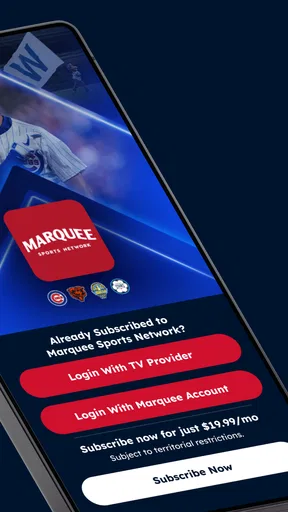
I also wouldn’t assume that installing a free app automatically settles every viewing question. The app itself costs nothing to download, while in-app purchases are listed at $19.99 per item. Before planning to watch a specific game, I’d check what access the app offers for that content and whether any purchase applies. That small check is more useful than discovering a restriction when you have already settled in to watch.
Build a practical game-day routine
My sensible workflow would begin before the first pitch: open the app, look for the Cubs-related coverage I want, and decide whether I’m watching live or catching up later. On a normal evening, that might mean checking the app before making dinner, then returning when I can give the game my attention. If I’m away from home, I would confirm the viewing option before relying on my phone as the only screen.
For a busy day, the best habit is to separate “I want to follow the game” from “I need to watch the whole game.” A short check-in on available coverage may be enough when I’m commuting or waiting for an appointment; a full viewing session calls for a more dependable connection and a suitable screen. This is not a promise that every situation will work equally well. It is a way to avoid treating a phone app as a guaranteed substitute for a planned TV session.
Where it sits among sports alternatives
Compared with a scores-first app, Marquee’s appeal is its connection to the Cubs’ local network, rather than broad score tracking as the main event. Compared with a general live-TV or sports service, its strength is that same narrower identity; its trade-off is that Cubs followers get more reason to open it than fans who want many teams in one place. I’d keep a league-wide scores app alongside it if I cared about standings and results across baseball, and use this app when I wanted to focus on the local Cubs experience.
That distinction also helps set expectations for households with mixed interests. A Cubs fan may find a team-specific destination worthwhile, while someone who watches different sports depending on the season may prefer a broader service as their daily starting point. There is no need to make one app do every job: the useful choice is the one that matches what you actually watch.
Worth Reading Before You Choose

Flipboard Shows What News Apps Must Do Beyond the Feed

Switching to Android Auto Means Rethinking Your Driving Routine

Google Calendar Makes a Crowded Week Easier to Manage

Ludo King Makes the Most of the Minutes Between Plans

Baby Panda World Brings Quick Play to Modern Phones, but Its Game Library Feels Busy

ESPN’s Live Game View Makes Following Close Games Easier
A Sports Fan’s Paradise
First off, let’s talk about what makes the Marquee Sports Network app a standout. This isn’t just another run-of-the-mill sports app. Oh no, it’s packed with features that cater to die-hard sports enthusiasts. Whether you're a baseball buff or a basketball aficionado, there’s something here for everyone.
Live Streaming and On-Demand Content
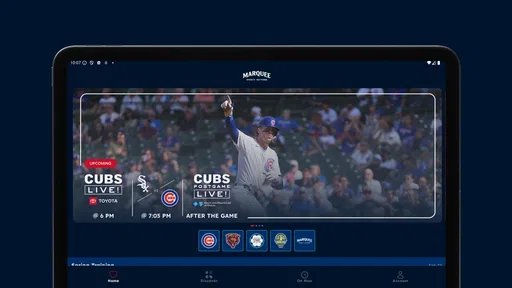
One of the most impressive features of this app is the ability to stream live games. Picture this: you’re stuck in traffic or waiting for a delayed flight. Normally, you’d be pulling your hair out in frustration, but with this app, you can catch live games right on your phone. It’s like having a magic portal to your favorite sports arena.
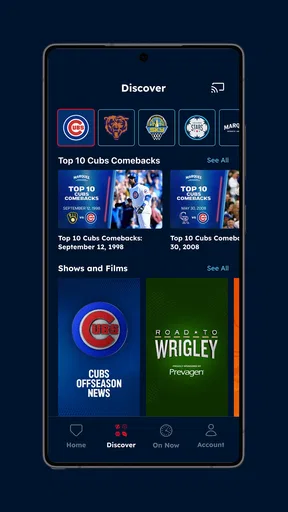
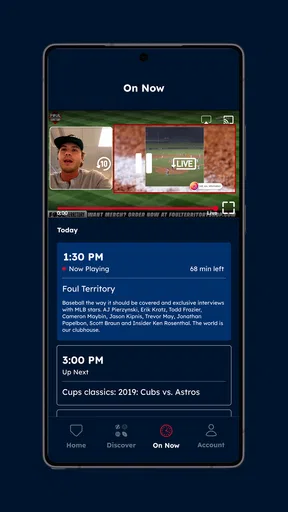
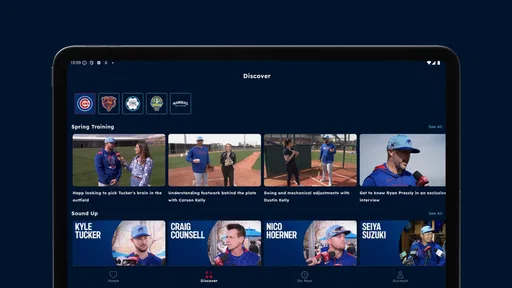
And if you miss a game, no worries. The app offers a treasure trove of on-demand content. You can watch replays, catch highlights, or delve into exclusive interviews with your favorite athletes. It’s like having a 24/7 sports channel in your pocket.
For my own planning, I’d think about missed coverage in two different ways: catching a particular moment, or making time to revisit the full game. Highlights fit a quick break; a replay asks for more time and a less distracting setting. That distinction is helpful when I’m deciding whether to open the app during a packed day or save it for later. I would also check that the content I want is available before setting aside time, rather than assuming every live event has the same catch-up options.
Streaming on a phone is convenient, but it is not always the most comfortable way to watch a long game. A larger screen is better when I’m home and want to follow the action closely; the phone makes more sense when I’m out and only have a short window. That trade-off is particularly relevant for baseball, where a casual viewer may dip in and out while a devoted fan wants to stay with the game.
User-Friendly Interface
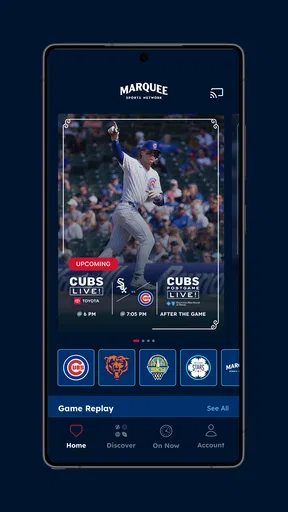
Now, I’m not the most tech-savvy person out there, but navigating this app is a breeze. The interface is sleek and intuitive, which means you won’t spend ages trying to figure out how to find what you want. The layout is clean, with everything organized into neat categories that make browsing a pleasure.
Even with a straightforward layout, I’d make the first visit a quick orientation rather than waiting until game time. Browse the available sections when there is no pressure, so you know where to look when you have only a few minutes. That is a simple but useful way to reduce game-day friction, especially if you plan to switch between live coverage and other material.
Customizable Alerts
Let’s face it, life gets busy, and it’s easy to lose track of game schedules. But with the app’s customizable alerts, you can set reminders for upcoming games, scores, or breaking news. It’s like having your own personal assistant keeping you updated on everything sports-related.
Alerts work best when I use them to prompt a decision, not as a replacement for watching. A reminder can tell me it is time to check the app, while a score update can be enough if I am in a meeting or on the move. I would keep notifications focused on the Cubs content I care about; too many interruptions can make a helpful sports tool feel noisy. For anyone who prefers to follow quietly, opening the app when convenient may be a better fit than relying on alerts.
Check access before making plans
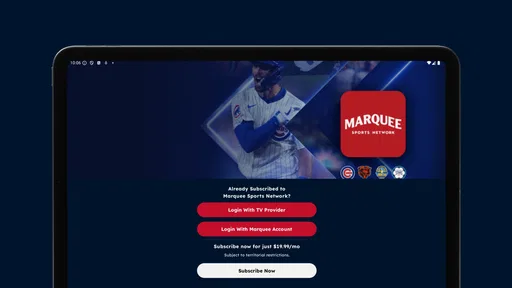
A realistic game-day handoff might look like this: I notice a reminder, open the app, check the current Cubs coverage, and decide whether to watch on my phone or wait until I’m home. If the viewing option involves an in-app purchase, I can make that decision before kickoff rather than in the middle of a busy evening. The app is free, but purchases are listed at $19.99 per item, so I would treat the price of any specific content as something to review in context instead of assuming every stream is included.
The app is rated for Everyone, which makes its audience broad, but that does not mean every household will use it in the same way. A parent might use it to follow the Cubs while a child is nearby; a devoted adult fan might use it for focused game viewing. In either case, I’d keep the actual viewing plan simple and make sure the device and connection suit the session.
More Than Just Scores
If you’re the kind of person who likes to dive deep into stats, the app has you covered. Detailed statistics for teams and players are right at your fingertips. You can analyze performance metrics, compare player stats, and even get insights into upcoming matches. It’s a stat lover’s paradise.
For a practical use, I’d pair a quick stats check with watching rather than trying to turn the app into a full research desk. Before a game, looking at the team or player information can give me something specific to pay attention to; afterward, it can help put a performance in context. That is more satisfying than scrolling through numbers without a question in mind. If I need broad league comparisons or coverage across many teams, I would still reach for a general sports source, then return here when the Cubs are the focus.
Community Features
One thing I didn’t expect was the community aspect of the app. You can join discussions, share your thoughts on recent games, and even engage in friendly banter with other fans. It’s a great way to connect with fellow sports lovers and share your passion.
Community discussion is most useful to me after I have watched enough to form my own view. It can add a fan’s perspective to a close finish or a surprising performance, but it is not a substitute for the coverage itself. If I’m watching with friends or prefer to keep sports discussion outside the app, this part may not change my routine at all. I’d approach it as an optional social layer, not a requirement for getting value from the network.
Who will get the most from it
I’d recommend trying it first if you regularly follow the Cubs and want a mobile route into their local network’s coverage. It also makes sense for someone who watches at home but occasionally needs a way to check in while away, or who likes to combine game viewing with team-focused information and fan discussion. The app’s identity is clear enough that a Cubs-centered viewer can decide quickly whether it belongs in their rotation.
I’d skip it as my main sports app if I rarely watch the Cubs, want one place for many leagues, or primarily need fast scores without video and team-specific material. A broader sports app is a better everyday hub for those needs. And if I’m choosing a service mainly for reliable large-screen viewing, I’d compare the available TV options before building a routine around a phone app.
What to expect from the app itself
Marquee Sports Network has a 3.4 average rating from over 800 ratings, with more than 600 written reviews and over 100,000 installs. I read that as a sign that the app has a real audience but may not be a friction-free fit for everyone. Ratings can’t tell me whether it will suit my device or viewing habits, so I’d use the first session to test the parts I care about: finding Cubs coverage, understanding access, and deciding whether the mobile experience works for me.
The current version is 26.6.0, and the app requires Android 7.0 or later. It is free to install, with in-app purchases listed at $19.99 per item. Those details make the basic decision straightforward: check device compatibility, install it without an upfront app price, and pay attention to any purchase prompt before proceeding. I wouldn’t plan a paid viewing experience until I understood exactly what that purchase covers.
Final Thoughts
So there you have it, folks. The Marquee Sports Network app isn’t just an app—it’s an experience. Whether you're watching live games, diving into detailed stats, or connecting with a community of fans, there's something here for every sports enthusiast. If you’re looking to enhance your sports-watching experience, this app is definitely worth checking out.
Download it, give it a whirl, and let me know what you think. You might just find it becomes your new favorite way to enjoy the world of sports. Happy watching!
My recommendation is more specific: give it a try if following the Cubs is a regular part of your week, but treat it as a focused companion rather than a replacement for every sports app or viewing option you use. I’d explore it before game day, check the access for the coverage I want, and decide whether its mix of viewing and team-centered material fits my routine. That little bit of preparation makes it easier to enjoy what the app is for—and easier to recognize when another option is the better choice.
Pros
- High-quality sports streaming available.
- User-friendly interface and navigation.
- Comprehensive coverage of local teams.
- Regular updates with new content.
- Option to customize notifications.
Cons
- Limited to specific regional markets.
- Subscription required for full access.
- Occasional streaming delays reported.
- App may lag on older devices.
- Content focus may not suit all fans.
FAQs for Marquee Sports Network
What is Marquee Sports Network and what content does it offer?
Marquee Sports Network is a sports-focused app that provides live streaming and on-demand content for Chicago Cubs games, interviews, and other sports-related programming. It offers exclusive coverage of games and additional shows featuring in-depth analysis, player interviews, and behind-the-scenes footage. Fans can enjoy a comprehensive sports experience wherever they are.
Is there a subscription fee for Marquee Sports Network, and what are the subscription options?
Yes, Marquee Sports Network requires a subscription fee. Users can choose from various subscription plans, including monthly and annual options. Pricing may vary based on the user's location and cable provider. Subscribers gain access to live games, on-demand content, and exclusive features. Be sure to check if your cable provider offers this network.
Can I watch Marquee Sports Network on multiple devices simultaneously?
Yes, the Marquee Sports Network app supports multi-device streaming, allowing users to watch content on several devices at the same time. This feature is perfect for households with multiple sports fans or for those who like to switch between devices. Ensure your subscription plan supports multiple logins for seamless access.
Does Marquee Sports Network offer any additional features for enhanced viewing?
Marquee Sports Network includes various features to enhance the viewing experience, such as live game statistics, real-time score updates, and interactive features like polls and quizzes. Users can also customize their notifications to receive alerts about upcoming games, breaking news, and special programming. These features provide a more engaging sports experience.
Are there any geographical restrictions for accessing Marquee Sports Network content?
Yes, there are geographical restrictions for Marquee Sports Network. The app is primarily available to users in the United States, particularly in regions where the Chicago Cubs have a strong fan base. If you are traveling or residing outside the supported areas, you may encounter restrictions. A VPN may not always resolve these limitations, so check availability in your location.


